region op• Data kinds: region → image
• Call: fullseye.apply(img, "dist_transform_abs", a=0.5, b=0.5) (the 2-D model is one image plus two scalar knobs a,b∈[0,1])
• HALCON equivalent: distance_transform (the HALCON reference is a useful guide to its meaning and parameters)
• GPU: none (CPU reference implementation only)
*The figure is the actual output on a synthetic 128×128 input. Left: input, right: output. Point clouds are drawn as a top-down scatter (brightness = z), 1-D series as a line plot, volumes as the maximum-intensity projection along z, videos as the middle frame, complex images as magnitude; return values that are not pictures are shown as the values themselves.*
*The output is shown in a viridis-like pseudo-colour (dark purple = low, yellow = high) so that a field of quantities — distance, phase, orientation, depth — can be read.*
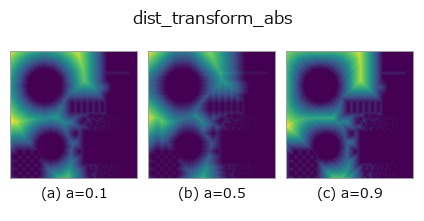
Sweeping knob a (0.1 / 0.5 / 0.9, the other knob at its default):
▸ dist_transform_abs: knob a sweep (docs site)
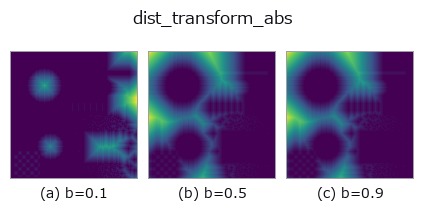
Sweeping knob b (0.1 / 0.5 / 0.9, the other knob at its default):
▸ dist_transform_abs: knob b sweep (docs site)
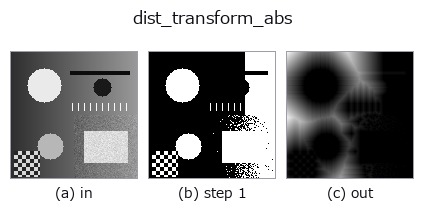
Stages (the ops that come before → this op, left to right):
▸ dist_transform_abs: stages (docs site)
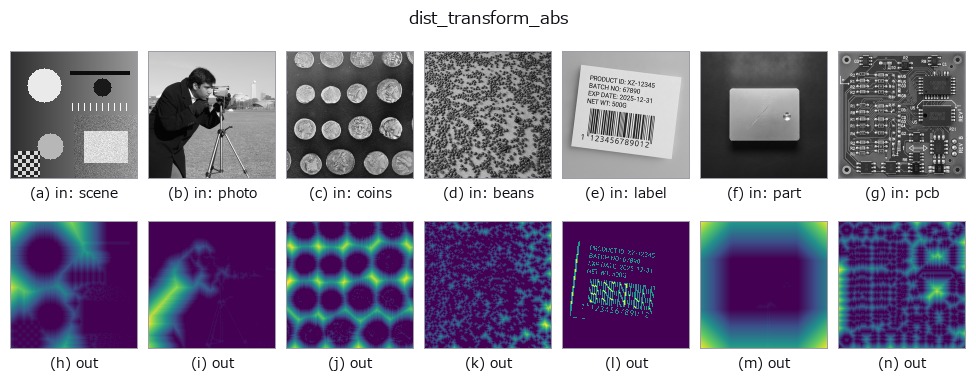
On other images (synthetic scene / photo / coins. Top row: inputs, bottom row: their outputs. Knobs at default):
▸ dist_transform_abs: other inputs (docs site)
Distance transform in absolute pixel distances without normalisation. Equivalent to HALCON's distance_transform (Compute the distance transformation of a region.).
a selects the distance type: a < 1/3 Euclidean, 1/3 <= a < 2/3 city-block (L1), otherwise chessboard (L∞). b < 0.5 returns, for every foreground pixel, the distance to the nearest background pixel; b >= 0.5 returns, for every background pixel, the distance to the nearest foreground pixel. The output is a float64 image and, unlike dist_transform, is not normalised by the per-image maximum (the centres of a 3×3 and a 9×9 square surrounded by background are 2 and 5 respectively). Example: _dist_transform_abs(np.pad(np.ones((3, 3)), 1), 0, 0)[2, 2] is 2.0.
★Until 2026-11-05 (adversarial verification, round 2, P4b), this example read np.ones((3, 3)) (no background), and the actual value was 2.236, not 2.0 (the degenerate input below).
When the target to measure the distance to is not in the image (b < 0.5 with not a single background pixel, b >= 0.5 with no foreground), the distance is undefined (infinite). In that case the op returns a uniform 0 ("no distance field") -- an empty region is a legitimate input (an all-background image with b >= 0.5 as well as an all-foreground image with b < 0.5), so it is not an exception. Do not read the 0 as a distance:
check on the input side with region.any() / (~region).any() whether the target exists. The result is uniform in both directions, so it commutes with flipping and rotating the image. Until 2026-11-05 (adversarial verification, round 2, P4), distance_transform_edt returned a slope (1 to 3.6 on a 3×3) as if the target were at (-1, 0) outside the image, and cdt returned a uniform -1.
The HALCON reference operator returns int4 approximations. This op returns exact float64 distances and is not a compatibility API.
Raises:
FsValueError: The image contains NaN / inf.
• gallery2d_region family guide
• Sample-data catalog (download URLs / licences) — 2-D uses skimage.data (BSD/public domain) plus synthetic images; 3-D lists download URLs for real data sources (Stanford, PDS, …).
• Operator provenance and references — the sources of the research/methods this op family came from.
• The canonical algorithm (author, year) and its uses are named in the family usage guide above.
The program below has been verified to run (same input as the figure). In Studio's help this block becomes buttons that load and run it on the spot.
threshold 0.50 0.50
dist_transform_abs 0.50 0.50
▸ Load this pipeline · Load & run
• gallery2d_region — py -3.11 examples/gallery2d_region.py
image as input)identity · gaussian · mean_box · mean_box_wh · bilateral · kuwahara · unsharp · median
region)reg_erode · reg_dilate · reg_open · reg_close · fill_holes · select_largest · remove_small · invert_region
*Provenance: ops.py — 2D operator registry. This per-op note is generated by tools/opdocs.py md (do not hand-edit).*
© 2026 Kazufumi Furuse — Fullseye operator documentation. Licensed under Apache-2.0.